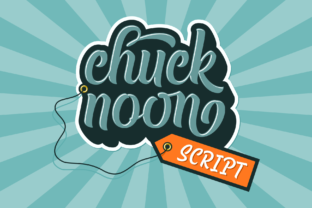
Chuck Noon Script: The Retro Typeface for Modern Editorial Design
When you are looking for Fonts that instantly elevate a publication’s visual identity, Chuck Noon Script offers a distinct advantage by blending bold strokes with a relaxed, vintage aesthetic. This Script Handwritten typeface is not just a decorative element; it is a strategic tool for editorial designers who want to inject personality into their layouts without sacrificing clarity. Whether you are designing a digital newsletter, a print magazine, or an ebook cover, the right typography sets the tone before the reader processes a single word of content.
In an era where attention spans are short and visual competition is fierce, using a creative font like Chuck Noon can help your brand stand out. It brings a "cool feel" to any design project, allowing creators to bridge the gap between traditional print aesthetics and modern digital consumption. By understanding how this typeface functions within a broader design system, publishers can enhance reader engagement and create a more cohesive brand experience across all platforms.
Chuck Noon Script for Magazine Covers and Digital Headers
The primary strength of Chuck Noon Script lies in its ability to command attention as a display font on high-impact surfaces. For magazine covers and blog headers, the clean lines and bold weight of this Script Handwritten style ensure that headlines remain legible even at smaller sizes or when viewed on mobile devices. Unlike overly ornate calligraphy that can become illegible clutter, Chuck Noon maintains a structured geometry that anchors the design.
When designing a digital header for a lifestyle blog or a creative portfolio, pairing the bold script with ample white space allows the text to breathe. This approach aligns with modern web design principles that prioritize readability and user experience. The retro spin provided by the font adds a layer of nostalgia and warmth, which is particularly effective for brands focusing on wellness, travel, food, or personal development. It signals to the reader that the content is both stylish and substantial, encouraging them to click through and engage with the article.
Using Bold Scripts for Pull Quotes and Callouts
One of the most effective ways to use Chuck Noon Script in long-form content is for pull quotes and key takeaways. In editorial design, breaking up dense blocks of text is essential for maintaining reader interest. By extracting a powerful sentence from the body copy and rendering it in this Font, you create a visual rhythm that guides the eye down the page. The contrast between the handwritten script and the standard serif or sans-serif body text creates a dynamic hierarchy that makes the content more scannable.
- Visual Break: Use the script to interrupt monotony in text-heavy articles.
- Emphasis: Highlight testimonials or critical data points to increase retention.
- Brand Voice: Consistently using the same script for quotes reinforces brand identity.
Chuck Noon Script for Ebook Titles and Chapter Openers
For authors and course creators, the first impression of an ebook is crucial. Chuck Noon Script serves as an excellent choice for ebook titles because it conveys professionalism mixed with approachability. A book cover featuring this Script Handwritten typeface suggests a narrative that is personal yet polished. When used for chapter openers, the font helps to signal transitions in the reading journey, giving the designer a versatile tool to structure the internal layout of digital publications.
The versatility of this typeface extends to various genres. For a business guide, the boldness of the letters implies authority and confidence. For a memoir or a creative non-fiction piece, the "cool feel" adds a touch of artistic flair. When selecting premium font assets for publishing projects, it is important to choose one that adapts well to different contexts. Chuck Noon achieves this balance, making it a reliable asset for creating consistent visual branding across multiple chapters and sections.
Pairing Display Fonts with Readable Body Copy
To maximize the effectiveness of Chuck Noon Script, it must be paired correctly with a complementary typeface. As a display font, it should not be used for long paragraphs of body copy. Instead, pair it with a highly readable serif font for main text or a clean sans serif font for captions and navigation elements. This combination leverages the strengths of each type: the script provides character and flair, while the secondary font ensures accessibility and ease of reading.
- Identify the Role: Determine if the font will be used for headings (display) or body text (readability).
- Select a Pair: Choose a neutral serif or sans serif that contrasts enough with the script to avoid visual clash.
- Test at Scale: Preview the pairing on both desktop and mobile screens to ensure harmony.
Chuck Noon Script for Printable Guides and Lead Magnets
In the realm of digital marketing, printable guides, worksheets, and lead magnets are powerful tools for building email lists and establishing authority. Chuck Noon Script adds a premium touch to these downloadable assets. When users receive a PDF workbook designed with this Script Handwritten font, it feels less like a generic template and more like a bespoke product. The retro aesthetic can make educational materials feel more inviting and less intimidating, which is particularly useful for complex topics or self-help guides.
Designers creating content for social media graphics can also leverage this font. Short-form content often relies on bold typography to stop the scroll. Using Chuck Noon for quote graphics or announcement posts allows creators to maintain a consistent visual language across their blog, newsletter, and social channels. The font’s clean structure ensures that it reproduces well in both digital formats and high-resolution print outputs, making it a practical choice for multi-channel campaigns.
Considerations for Commercial Licensing and Usage
Before integrating Chuck Noon Script into client work or commercial products, it is vital to review the licensing terms. Most Fonts come with specific restrictions regarding how they can be used, especially for resale items like templates or digital downloads. Understanding whether the license covers commercial use, client publications, and unlimited prints ensures that your design work remains legally compliant.
By carefully selecting and applying Chuck Noon Script, editorial designers and content creators can significantly enhance the aesthetic quality of their projects. Its unique blend of boldness, cleanliness, and retro charm makes it a standout option for anyone looking to add a distinctive voice to their written content. Whether you are designing a wedding invitation suite, a coaching workbook, or a corporate newsletter, this Script Handwritten font provides the visual punch needed to capture attention and convey message effectively.